


Areas We Cover
Categories

How Independent Stage and Film Creators Can Turn Prompts and Production Stills into AI Video with insMind
Stage and screen artists have always borrowed from the technology of their moment. Electric light changed the stage. Digital sound altered the rehearsal room. Online trailers changed how audiences discover a play, a concert, a dance work, or a small film that might otherwise be missed.
The newest shift is not simply that AI can generate images. It is that AI video tools now let creators start with an idea, a poster, a rehearsal still, or a production photograph, then test motion before committing to a full shoot. That matters for independent artists, because promotional video is often needed long before a company has the time, crew, or budget for a polished campaign.
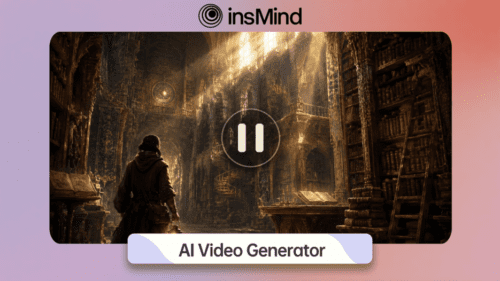
The insMind AI video generator is one practical way to approach that gap. It gives creators a browser-based workflow for making short clips from text prompts or images, which can be useful for theater previews, film pitch decks, festival announcements, social media teasers, and visual mood studies.
Why AI Video Fits the Performing Arts
A show is not only a title and a date. It has atmosphere. A dance piece has velocity. A chamber opera has tone. A low-budget short film has a visual world that may be clear in the director’s head but difficult to explain in a paragraph. This is where AI video can be helpful: not as a replacement for performers, directors, designers, editors, or cinematographers, but as a fast way to make an idea visible.
For a theater company, that might mean turning a key art image into a moving teaser for Instagram. For a filmmaker, it might mean creating a mood clip that helps a producer understand the scene before a location is booked. For a festival or arts venue, it might mean making several short announcement videos from existing images instead of designing every asset from scratch.
In this context, insMind is best understood as a creative pre-production and promotion tool. It helps teams move from concept to visual sample quickly, which is especially valuable when marketing windows are short and attention is crowded.
Article Type and Tool Category
| Decision | Selected Direction | Reason |
| Article type | Guide | The topic is best served by a practical walkthrough that shows readers how to create a usable AI video asset. |
| Tool category | Image to video, text to video, AI video generation | Stage and film creators may begin with either a written concept or an existing production still, poster, or publicity image. |
Start with the Target: The Clip You Need
The most useful AI video projects begin with the intended use, not with a random prompt. A 9:16 teaser for a Fringe show, a 16:9 pitch visual for a film deck, and a square social post for a venue announcement all need different framing. Before using insMind, decide what the clip must accomplish.
- For theater promotion: Create a short mood teaser from a poster, rehearsal photo, or key art image.
- For film development: Turn a scene description into a visual reference for a pitch or pre-production conversation.
- For dance and music events: Add motion to a production still or event image to suggest energy and atmosphere.
- For social media: Generate several short variations and choose the one that best matches the campaign tone.
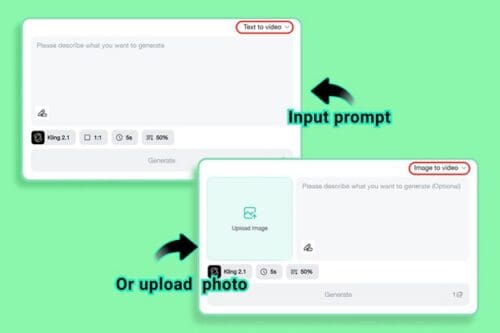
If there is no existing image, the insMind text to video workflow is the cleaner starting point. If the image already exists and must remain the visual anchor, the insMind image to video workflow is usually more appropriate.
Practical rule: use text when the AI should imagine a scene; use an image when the subject, poster, performer, product, or production still must stay recognizable.
Prompt Ideas for Stage and Cinema Creators
Because the goal is to make a useful video, the prompt should describe action, mood, camera movement, and publishing purpose. The following examples can be adapted to different productions.
| Use Case | Prompt Direction |
| Theater preview | A quiet empty stage before opening night, warm spotlight slowly brightens, subtle dust in the air, cinematic slow push-in, dramatic but elegant theater trailer mood. |
| Indie film pitch | A neon-lit apartment hallway at night, tense atmosphere, slow handheld camera movement, realistic indie film style, moody shadows, no text on screen. |
| Dance promo | A contemporary dancer in silhouette, soft stage haze, fluid camera orbit, expressive movement, high contrast lighting, graceful performance teaser. |
| Festival announcement | A city marquee glowing at dusk, audience gathering outside, gentle camera rise, celebratory arts festival atmosphere, polished social media teaser. |
For image-based projects, keep the prompt shorter and more controlled. A production still already carries information, so the instruction can focus on motion: “slow camera push-in,” “gentle parallax,” “subtle stage light movement,” or “cinematic poster reveal.”
How to Create an AI Video with insMind
The following workflow uses insMind’s practical creation flow. The steps are written for arts marketers and creators who need a short video asset they can review, refine, and publish.
Step 1: Enter a Prompt or Upload a Production Image
Open insMind and choose the video generator workflow. If you are starting from an idea, enter a prompt that names the subject, setting, mood, action, lighting, and camera movement. For a theater teaser, that might be: “An empty black-box theater with one chair under a warm spotlight, slow camera push-in, dramatic rehearsal atmosphere, cinematic preview style.”
If you already have a poster, rehearsal photo, production still, or festival image, upload it instead. Then add a short motion instruction, such as “slow zoom toward the performer,” “subtle stage light sweep,” or “gentle cinematic poster reveal.” This keeps the original image as the foundation while adding movement.
Step 2: Select the Model, Aspect Ratio, and Duration
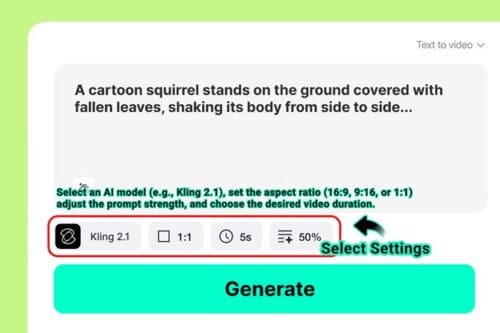
After adding your prompt or image, adjust the available settings. Choose the video model if options are available, then select the aspect ratio for the intended channel. Vertical video usually fits Instagram Reels, TikTok, and YouTube Shorts. Horizontal video works better for website embeds, pitch decks, trailers, and press materials.
Keep the first version short. For most arts promotion, a brief clip is enough to test mood and movement. If duration, quality, or prompt-strength options are shown, set them before generating so the output follows your creative direction as closely as possible.
Step 3: Generate the Preview and Review the Motion
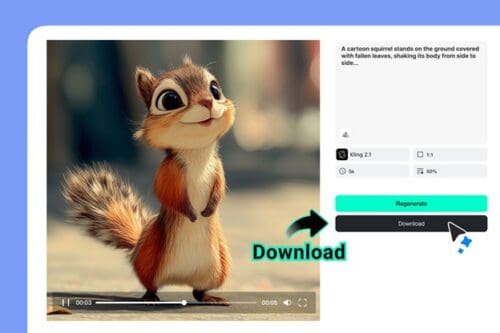
Click the generate button and wait for insMind to create the video preview. Review the result with a director’s eye. Does the motion support the story? Is the performer, object, or poster still clear? Does the lighting feel right for the production? Would this clip make someone curious enough to click, read, donate, buy a ticket, or watch the full trailer?
If the result is close but not quite right, revise the prompt. Replace vague words with direct visual instructions. Instead of “make it dramatic,” try “single warm spotlight, slow push-in, quiet stage atmosphere.” Instead of asking for many actions, keep the motion simple and focused.
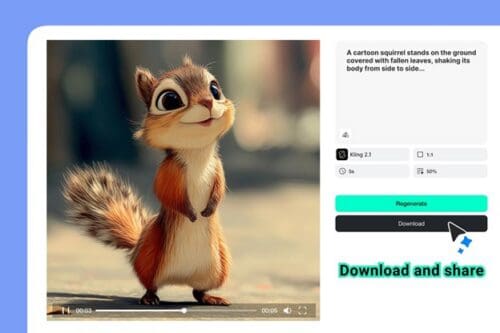
Step 4: Download the Video and Use It in Your Campaign
When the preview works, download the final video. It can be used as a social teaser, a website visual, a festival announcement, a pitch-deck asset, or a quick concept reference for collaborators. If you need multiple formats, return to the settings and create separate versions for vertical and horizontal channels.
Save the best prompt and settings after each successful result. A small company can use the same creative structure to build a consistent campaign: one teaser for the announcement, one for opening week, one for reviews, and one for the final ticket push.
Text to Video vs Image to Video for Arts Promotion
Both workflows can serve a campaign, but they solve different problems. Text to video is useful when the production is still conceptual. Image to video is useful when the campaign already has a visual identity.
| Workflow | Best For | Creative Example |
| Text to video | Early ideas, pitch visuals, scene concepts, mood studies | A filmmaker creates a visual reference for a night exterior before location scouting. |
| Image to video | Posters, rehearsal photos, production stills, cast images, event graphics | A theater marketer animates the official show art into a short opening-week teaser. |
| Combined workflow | Campaign exploration and final promotion | A company uses prompts to explore tone, then animates approved key art for public posts. |
Where insMind Can Help Most
insMind is especially useful when a team needs momentum. A small arts organization may not have a full video department, but it still needs posts, previews, banners, and visual material for fundraising or ticket sales. Short AI videos can fill that middle space between a still image and a full production trailer.
- Opening-week social posts: Turn a still or poster into a moving teaser.
- Pitch decks: Create a quick visual mood clip for a film, play, dance piece, or music project.
- Festival campaigns: Build multiple short clips from event art and venue imagery.
- Press outreach: Add a moving visual to emails, landing pages, or online media kits.
- Creative testing: Compare several visual directions before committing to a shoot or edit.
Keep the Human Work at the Center
The best use of AI video in the arts is not to flatten the work into a generic visual. It is to help the artist communicate faster. A generated clip can suggest atmosphere, but the production still belongs to the writers, performers, designers, directors, choreographers, cinematographers, editors, and crews who give the work its life.
That distinction matters. Technology is useful when it widens access to expression. For independent stage and film creators, insMind can make it easier to show a visual idea, animate a still image, and produce short promotional assets without waiting for a large budget or a long post-production process.
Final Thoughts
Audiences often decide quickly whether a show, film, concert, or event feels worth their attention. A well-made short video can help a production cross that first threshold. With insMind, creators can begin with either a prompt or an image, generate a preview, refine the motion, and download a usable clip for the next campaign step.
For the performing arts, that is not a substitute for the stage or the screen. It is a new way to invite people toward them.