


Areas We Cover
Categories

POSTER MOTION THAT SURVIVES A LOBBY SCREEN

by John Todd | July 11, 2026
in Extras, Technology
Arts marketers often ask for motion after the poster is already printed and cleared. The feed wants movement. The lobby screen wants readable wardrobe and title type. Those two demands fight. A whip-pan “energy” pass can wake the story slot and still fail the house manager in three seconds. That is the job this image to video walkthrough is for: one poster, one controlled move, one screen test.
The pressure sits with the house, not with the model list. Donor lobby loops and ticket stories share the same cruelty. If the costume color turns muddy or the title treatment softens, the clip is rejected even when the motion looks “modern.” I treat house-screen readability as the pass condition.
Write The Lobby Pass Before You Generate
Write three kill rules on paper first. Eyes stay readable. Costume color stays true. Title type on the poster stays sharp enough to read at lobby distance. If a take breaks any rule, it dies — even if the camera move feels exciting.
Say The Kill Rules With The House Manager
Say the rules out loud once with whoever owns the lobby screen. Marketing can love motion that a house manager will reject. Aligning that judgment before Generate saves a night of polite arguments about “energy.”
Name Lobby Crop Versus Story Crop First
Also name the channel. A 9:16 story and a 16:9 lobby loop are different crops. Stretching one export into both usually clips a forehead or a title edge. Plan two short runs if you need both.
Pick one legal-cleared still. Not five. Overnight coverage fails when marketing turns the archive into a buffet. One poster. One move. One test.
Prepare The Still And The Motion Sentence
Use a sharp poster frame, cast portrait, or set detail that already survived print. Soft scans and heavy Instagram filters fight the motion pass. If the still is soft, fix the still. Do not ask the generator to invent edge detail that was never there.
Write the motion like a camera operator brief: “slow push-in on the lead’s face, soft side light, wardrobe edges sharp.” Avoid stacked vibe words. “Epic magical cinematic emotional” is how faces warp and type melts.
Reject Stills That Cannot Survive A Push In
Half-shadow faces, tiny title type, and busy collage posters usually fail under even a gentle push-in. If you would not blow the still up on a lobby monitor, do not animate it. Choose another cleared frame.
How To Run The Still To Motion Pass
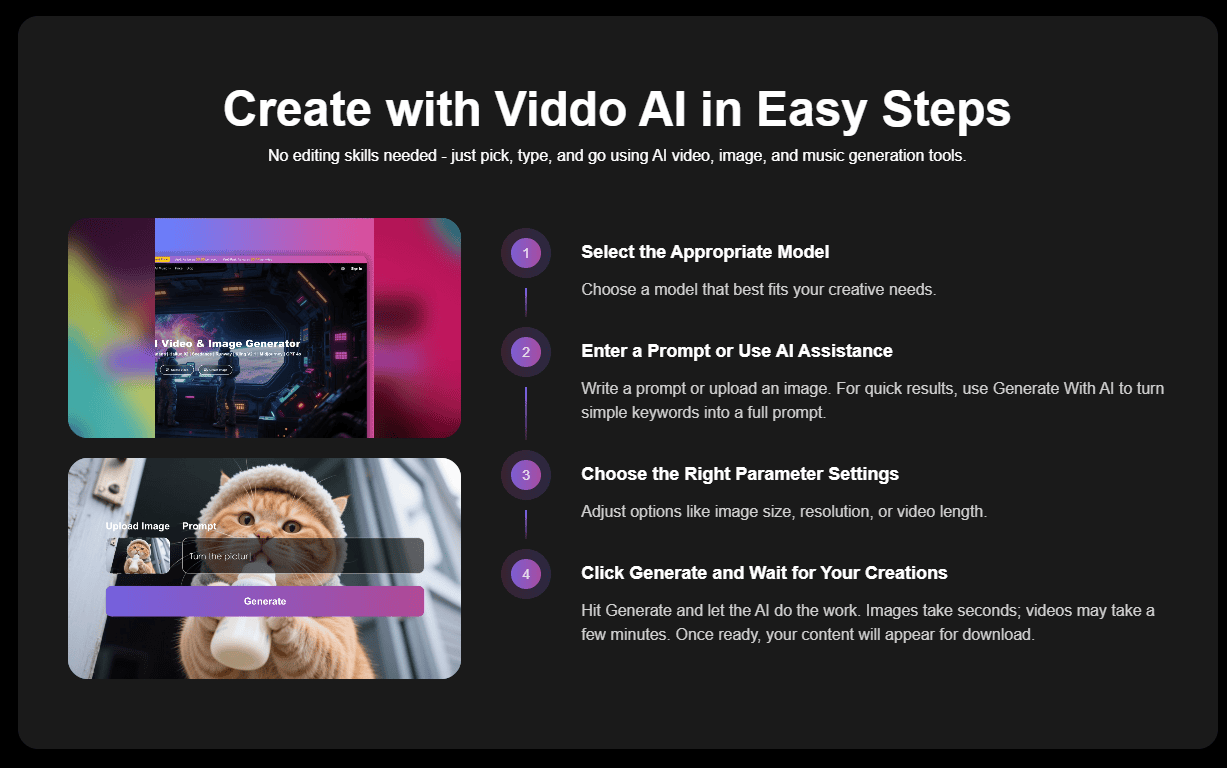
Open the image-to-video path inside Viddo AI. Upload the JPG or PNG still through Upload Media / Reference. The panel shows image(0/9) with optional video and audio slots when the model path allows a richer brief. Paste the one motion sentence. Set the knobs before credits burn.
| Knob | Lobby story | Ticket story |
| Video Ratio | 16:9 | 9:16 |
| Resolution | 1080p keep | 720p draft, 1080p keep |
| Length | use on-page control, 15s if needed | shorter beat usually enough |
| Seed | lock after a close take | lock after a close take |
Use the table as a preflight card. Do not invent knobs mid-generate because a take felt boring. Boring readable motion beats exciting mush on a house screen.
If you need both lobby and story crops, treat them as two lines on the same sheet. Rerun with 16:9 and 9:16 while Seed stays locked when continuity matters. That habit keeps Viddo AI in the coverage lane instead of opening a second taste fight.
Keep a short note of what failed. “Title mush at 9:16” is useful. “Didn’t feel cinematic” is not. The next take should fix a named fail, not chase a mood.
Step One: Set Ratio Resolution Length Seed
Set Video Ratio for the real screen. Draft at 720p while hunting. Keep at 1080p. Use the length control, including the 15s option when the beat needs room. Click Lock on Seed when a take is close so the next pass keeps style and character appearance steadier. Update Seed only when you want a fresh look on purpose.
Step Two: Freeze The Brief Then Generate Once
Upload the cleared still before you touch the model list. If the path allows richer references, the panel shows image slots up to nine plus optional video and audio — use them only when the lobby brief truly needs them. Do not open a second model “just to see.” Freeze ratio, length, and the motion sentence first. Credits move with model, length, and related options, so a wandering brief becomes an expensive taste poll.
If the prompt is thin, use Generate With AI once. Translate if English prompting behaves better. Leave Web Search off unless the brief depends on a live campaign fact. Change only one instruction between takes after Seed is locked.
Step Three: Play The File On A Real Screen
Download the candidate and play it on a phone at arm’s length and, if you can, on a larger monitor. Ask only the lobby questions. Can you read the eyes? Is the costume color true? Is the title still a title? If any answer is no, kill the take. If all answers are yes, stop.
Stand Where A Donor Actually Stands
If you can, stand where a donor stands. Distance lies on a laptop. A face that looks fine in a generate preview can lose eyes and type when the same file hits a real lobby panel. The house test is the product test.
Confirm Watermark Before Ticket Ads Leave
Free generations can carry a watermark. Paid plans remove it and allow commercial use under published terms. Confirm that before a ticket ad leaves the folder. A readable clip with a free-plan watermark is still a failed publish for many houses.
Common Mistakes That Fail The Lobby Fast
Animating a collage poster with tiny type usually fails first. Hard whip pans on formal portraits look like mistakes, not energy. Generating both ratios from one stretched export clips title edges. Publishing a free watermarked file turns a motion review into a watermark review.
Teams also fail by animating every cleared still in the folder. Overnight coverage is one frame that saves an empty slot. A full archive dump becomes visual noise and burns credits without a house pass rate.
If marketing wants “anything moving” by morning, answer with the three kill rules before you open the model list. Anything moving that fails wardrobe or type is not coverage. It is a new problem with motion on top.
Where Poster Motion Still Needs A Real Shoot
This pass will not replace a pickup day for complex blocking, crowd work, or a new concept. Soft or tiny-type posters still fail. Over-animating every archive still creates visual noise. Treat image to video as overnight coverage for one cleared frame, not as a season’s entire motion plan.
Run The Lobby Test Before You Publish
This walkthrough fits arts and performance marketers who need motion tonight from a poster that already cleared legal. It is a weak fit if the still is soft, the type is tiny, or you need a full production replacement.
Write the three kill rules. Animate one cleared still. Lock Seed on the close take. Play the file like a house manager. Viddo AI earns the seat when the lobby screen still accepts the wardrobe and the title after the move.
