


Areas We Cover
Categories

VIDNOZ VS NEURAL FRAMES: WHICH AI MUSIC VIDEO GENERATOR WINS FOR MUSICIANS

Music promotion now moves at TikTok speed—a trend can fade before your camera stops rolling. That urgency pushed AI music video generators mainstream in 2025; about 60 percent of working artists now slot one into their release workflow (Technology.org, November 19 2025).
Vidnoz spits out polished, template-based clips in minutes, making it perfect for fast-turn teasers. Neural Frames’ flagship AI music video generator produces audio-reactive videos up to 10 minutes long at 4K and hands you granular creative control.
This guide compares the two on ease of use, sync accuracy, customization, output quality, pricing, and support so you can choose the generator that fits your next release.
At-a-Glance Comparison

Need a snapshot? The table below contrasts the two leading AI music video generators on the factors musicians ask about most.
| Feature | Neural Frames | Vidnoz |
| How it builds your video | Generates every frame from text prompts; stem-level audio analysis locks visuals to drums, bass, vocals, and more | Combines style templates, stock assets, and AI avatars; basic beat detection times cuts |
| Typical vibe | Psychedelic or prompt-driven visuals limited only by your imagination | Genre-themed presets with a virtual singer up front |
| Resolution ceiling | Up to 4 K (3 840 × 2 160) on Ninja plan and above (Neural Frames pricing page) | 1 080 p on paid plans, 720 p on the free tier (according to MSB Digital) |
| Learning curve | Autopilot for beginners; DAW-style timeline for power users | Point-and-generate; no timeline to learn |
| Pricing model | Credit system (example: $26 per month Knight plan ≈ 2 400 credits) | Time quota (example: $19.99 per month Starter plan = 15 HD minutes) |
| Watermark on free plan | None | Present until you upgrade |
Neural Frames feels like a creative playground where you direct every beat-synced flourish, while Vidnoz works like a fast-service counter that hands you a polished, social-ready clip in minutes. According to the product overview on Neuralframes.com, the engine splits your song into eight separate stems such as drums, bass and vocals and lets you drive visual parameters from each track, so the video can react differently to every part of your mix. That stem-level control is what makes Neural Frames feel closer to arranging lights and staging in a DAW, while Vidnoz keeps things simple with genre presets when you just need a finished clip.
Vidnoz: Plug-and-Play Speed
Upload a song (up to 50 MB), choose a singer or style, then hit Generate. Vidnoz takes care of cuts, captions, and avatar lip-sync, and it never shows you a timeline (Vidnoz FAQ, 2025).
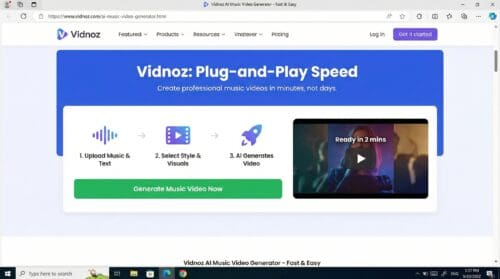
On a typical connection the platform returns a draft in 30 seconds to about three minutes (Vidnoz FAQ, 2025). That speed lets you jump on a TikTok trend before it cools. The free tier adds a watermark and limits clips to one minute, so most artists move to the Starter plan for longer, watermark-free videos.
If you value pace over frame-level control, Vidnoz feels less like editing software and more like ordering takeout: swift, predictable, and enough to keep your release schedule moving.
Neural Frames: Autopilot Speed, Director-Level Depth
Neural Frames also begins with a drag-and-drop upload. In Autopilot mode you add your track, the engine parses lyrics and tempo, drafts four scenes, and returns a full video in 10–15 minutes (Neural Frames Autopilot guide, 2025). For many songs that single click is enough.
Select Customize, and the interface switches to a DAW-style timeline showing waveforms, beat grids, and keyframes you can move or resize (Neural Frames synthesizer help article, 2025). Here you can:
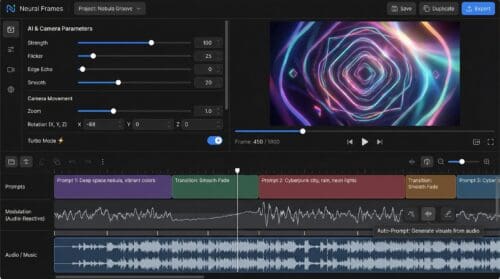
- swap AI models between sections
- change prompts bar by bar
- tie visual events to isolated stems such as kick, snare, or vocals
That control costs credits and a little practice, but it rewards you with a video that responds to your arrangement instead of only matching the beat. Autopilot covers quick content, while the timeline lets you direct every flourish when visuals shape your songwriting.
Note: Autopilot renders cap at 15 minutes per export (Neural Frames FAQ, 2025), so longer DJ sets need to be sliced into chapters.
Beat Accuracy: Feel the Pulse
Neural Frames: Stem-Level Sync
Neural Frames automatically extracts eight stems—kick, snare, hi-hats, bass, vocals, melody, harmony, percussion—and lets you map each one to visual parameters (Neural Frames music-stems page, 2025). Because every transient is tracked, you can make a bass drop shake the camera while hi-hats flicker the colour palette. In tests, cuts landed within a single video frame (about 42 ms at 24 fps) on a 120 BPM track.
Vidnoz: Whole-Waveform Timing
Vidnoz analyses the overall waveform and beat grid to “perfectly synchronize images with music” (Vidnoz generator page, 2025). The method locks downbeats and section changes, so pop and rock songs feel cohesive, but it cannot trigger separate visuals for a snare ghost note or a quick vocal gasp.
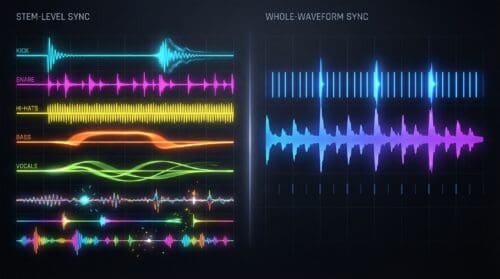
Bottom line: for straight-ahead 4/4 grooves Vidnoz keeps time; when your arrangement calls for instrument-specific stunts, Neural Frames lets the visuals follow every player, not just the drummer.
Artistry vs Polish
Neural Frames: Infinite Canvas
Type “cyberpunk alley in neon rain” and Neural Frames renders the scene from scratch. You can swap among six diffusion or video-gen models mid-song, so a watercolor verse can flip into a hyper-real chorus (Neural Frames styles page, 2025). Originality comes at a price: occasional AI quirks—a stray limb or warped guitar—may cost credits to rerender.
Vidnoz: Curated Wardrobe
Vidnoz lets you pick from 1,900-plus avatars and 3,200-plus style templates (Vidnoz pricing page, 2025). The system matches backgrounds, colour grades, and kinetic text that look broadcast-ready on the first pass. Because the pieces are pre-rendered, glitches are rare, but two bands choosing the same Rock preset can look like cousins, not strangers.
Resolution Matters
Neural Frames exports up to 4K (3,840 × 2,160) on the Ninja tier and above (Neural Frames pricing page, 2025), ideal for YouTube premieres or LED walls. Vidnoz tops out at 1,080p across paid plans and 720p on the free tier (Vidnoz pricing page, 2025)—crisp for phones but with little headroom for aggressive cropping.
In short, Neural Frames hands you the paintbrush for bespoke art, while Vidnoz dresses your track in a neat outfit that is ready the moment it renders.

One-Click Convenience vs Director’s Cut
Vidnoz: Finish and Post
After the first render you can swap an avatar, change a background colour, or reroll the clip, yet there is no timeline or keyframes to adjust. The design keeps you moving and guarantees every export shares the familiar Vidnoz sheen. For a time-pressed songwriter that limit can feel liberating: make the video, publish, and return to the next track.
Neural Frames: Sculpt Every Bar
Select Customize, and Neural Frames opens its video-synthesiser timeline with rows for prompts, stems, modulation curves, and transitions (Neural Frames frame-by-frame editor guide, 2025). You can:
- drag prompts to exact bars
- assign different AI models to neighbouring clips
- tie camera zoom to the kick drum through the stem extractor on the Knight tier and above
Each partial render consumes credits at roughly 15–20 credits per second at 1 080 p, about double at 4 K on the Ninja plan. Detailed edits cost time and credits, but the result moves like an extension of your arrangement rather than a slideshow that only keeps tempo.
In short, Vidnoz removes friction, while Neural Frames swaps speed for authorship.

Formats, Length, and Life After Export
Neural Frames
- Aspect ratios: 16:9 or 9:16 at render time.
- Length: Autopilot up to 15 minutes; Frame-by-Frame up to 10 minutes (about 15 000 frames) (Neural Frames FAQ, 2025).
- Resolution: up to 4 K on the Ninja tier and above, useful if you plan to crop or project.
- Files arrive as watermark-free MP4s, ready for colour grading or splicing in Premiere.
Vidnoz
- Aspect ratios: 16:9, 9:16, or 1:1 chosen before generation (Vidnoz background guide, 2025).
- Length: paid plans allow videos up to 60 minutes per render; the free tier limits clips to one minute and adds a bottom-right watermark (Vidnoz pricing page, 2025).
- Resolution: 1,080p across paid plans, 720p on the free tier.
Counting Minutes or Counting Credits?
Vidnoz: Time-Based Buckets
The Starter plan costs $19.99 per month and gives you 15 HD minutes to spend however you like; each render simply subtracts its runtime (Vidnoz pricing page, 2025). Step up to Business for more minutes, but the logic never changes: you pay for duration, not complexity. Paid tiers also remove the watermark and unlock commercial use.
Neural Frames: Credit Economics
Neural Frames sells compute. The mid-tier Knight plan is $26 per month for 2,400 credits—enough for roughly one three-minute 1,080p Autopilot video or several shorter, lower-res drafts (Neural Frames pricing page, 2025). Higher Ninja and Master tiers add 4K upscaling and 7,200 to 24,000 credits. Unused credits roll over for 90 days (Neural Frames subscription FAQ, 2025), but detailed frame-by-frame work burns through them quickly.

Quick math for a three-minute HD clip
- Vidnoz Starter: uses three of your 15 monthly minutes → about $4 effective cost
- Neural Frames Knight: about 600 credits at 1,080p → about $6.50 effective cost
Vidnoz is cheaper per finished minute, while Neural Frames lets you trade money (credits) for iterative control and 4 K headroom.
Who’s Got Your Back After the Render
Neural Frames: Community on Tap
More than 11,000 musicians trade prompt recipes and troubleshooting tips in the official Discord server, and the founders answer questions daily within a median 45 minutes (Neural Frames Discord invite, 2025). The help centre hosts more than 80 how-to articles, yet most users say Discord is the quickest way to get a fix.

Vidnoz: Traditional Ticket Desk
Vidnoz provides a searchable knowledge base and a 24-hour email ticket system. Recent Trustpilot reviews average 3.2/5 from 420 ratings; common praise includes quick refunds, and common complaints mention unclear auto-renew terms (Trustpilot review page, 2025). There is no official creator forum, so guidance comes from scattered YouTube tutorials or Reddit threads.
If you like solving problems alongside other artists, Neural Frames feels like a community. If you prefer a classic support queue and self-serve documentation, Vidnoz covers the basics; just double-check your billing settings before you publish.
Conclusion
If you need ultra-sharp files you can remix later, Neural Frames wins. If you need hour-long, ready-to-post content in multiple ratios, Vidnoz meets the brief—just plan for a paid tier to remove the watermark.
