


Areas We Cover
Categories

UPSCALING INDIE FILM FOOTAGE FOR FESTIVAL SUBMISSIONS
by Lamont Washington | June 7, 2026
in Extras, Technology
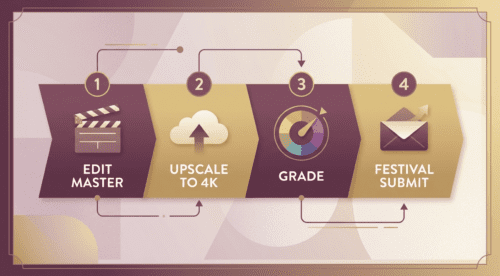
Sundance, Tribeca, and most respected festivals quietly raised their preferred delivery specs to 4K in the last two years, and several streaming acquisitions teams now treat 4K as a baseline. For indie productions that shot the bulk of their A-camera footage on lower-resolution gear — Blackmagic Pocket 4Ks, mirrorless hybrids, or older Sony FS series bodies — that quiet shift can stall a festival run. The 2026 fix is no longer expensive: AI upscaling tools can lift a 1080p or 2K cut to a passable 4K master with most of the perceptual fidelity preserved. Here is the workflow that is becoming standard. The producers who succeed in the next festival cycle will not necessarily be the ones with the largest gear budgets but the ones who understood that the post-production stack changed underneath them.
Why upscaling is now part of post
Festival delivery has always had a deliverables-vs-acquisition gap. The aspirational top-tier delivery format used to track expensive gear, but cheap monitors and accessible AI shrank both ends of the cost curve. A 1080p shoot used to be cinema-ready; in 2026 it reads as soft. Upscaling does not turn a 1080p source into a real 4K capture, but it closes the perceived gap enough that a programmer or acquisitions executive can focus on the story instead of the resolution.
What to look for in an upscaler for narrative work
Narrative footage has different demands than user-generated or sports content. Four criteria matter most.
- Skin texture handling. A bad upscaler waxes faces. A good one preserves pore and shadow detail.
- Edge integrity in motion. Pan-and-tilt shots should not introduce shimmer along high-contrast edges.
- Grain preservation. Stylised grain is intentional. The upscaler should keep it, not remove it.
- ProRes and DNxHR output. Festival delivery codecs are not the same as social-media codecs.
The first three are quality checks; the last is the practical deal-breaker for many cloud tools.
Four upscalers tested on indie material
We ran a 1080p ARRI Amira backup take, a 2K Pocket 4K interior, and a UHD-down-resed Sony A7S clip through each tool. Hardware: a colorist workstation with an NVIDIA RTX 4090 for desktop apps and a Chrome browser for cloud tools.
UniFab Video Upscaler AI
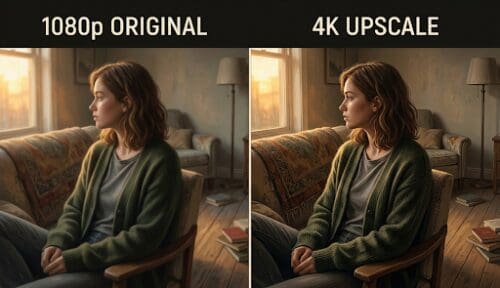
The AI Video Upscaler supports up to 16K output through four specialised models (Equinox, Kairo, Vellum, Titanus) and can run either on local GPU or through FabCloud. The Vellum model handled our Pocket 4K interior with credible texture preservation on the actress’s wardrobe, and the FabCloud option is useful for studios without their own GPU pipeline. The trade-off is that the deepest upscale path is desktop-only, so cloud-only teams will use the 2x web tier instead.
Invideo Agent
For filmmakers who need more than restoration and finishing, invideo agent takes a broader production approach by helping build and manage the entire creative workflow. Instead of treating each shot as an isolated generation, it maintains project context across characters, scenes, references, and creative decisions. Filmmakers can develop ideas, generate shots, and maintain visual continuity across larger projects without repeatedly rebuilding the brief.
Topaz Video AI
Topaz is the desktop reference for narrative work, with model presets like Proteus Fine Tune that colorists prefer for grain integrity. The $299 license and the lack of a free tier are minor frictions for production budgets but real ones for first-time submissions.
HitPaw VikPea
HitPaw VikPea offers an approachable interface and a useful face-restoration model. It is less commonly used in narrative pipelines than the two above, and the watermarked trial is a real limit for serious testing.
Pixop
Pixop is the cloud option for studios used to pay-per-minute pricing. The filter quality is strong on cinematic source, and the codec output is more delivery-friendly than most cloud tools. The per-minute cost scales unfavourably for very long-form work.
A festival cut that travelled further than expected
A first-time director we spoke with had her sub-2K feature accepted to a regional festival but rejected by two larger ones over deliverable specs. Over four weeks she re-mastered the picture using a cloud-based UniFab Video Enhancer AI Online pass on her 1080p master, then ran a final desktop upscale at her colorist’s studio. The next submission round produced an acceptance and a second-round meeting with a distributor. Her honest note: the AI did not turn the picture into something it was not. It removed the resolution distraction so the people watching could see the story.
FAQ
Does upscaling change my colour grade?
It can. Re-grade after upscaling, not before, and confirm your reference monitor matches the new resolution.
Will festivals know if I upscaled?
Skilled programmers can usually tell. Be honest in technical specs; nobody is offended that a 2026 first feature was finished with AI.
Should I deliver upscaled DPX?
Only if a specific festival or distributor requests it. ProRes 4444 or DNxHR HQX cover most requirements.
Can I upscale on a laptop?
Yes for short cuts, but a feature-length pass on a laptop will take many hours. Plan around your hardware.
How early should I plan upscaling in the post pipeline?
Decide before locking picture. Upscaling rewards re-grading after the pass, so colour decisions should be staged accordingly with the colorist in the loop.
Final thoughts
Upscaling has joined the standard post pipeline for indie production whether or not it is talked about openly. The honest version is that it lets smaller budgets meet larger deliverable expectations, which is a quiet win for the part of the industry that depends on first-time filmmakers being able to get their work in front of programmers at all.
