


Areas We Cover
Categories

THE DIRECTOR’S ROLE IN TURNING AI CLIPS INTO COHERENT SCENES
by Jim Allen | July 25, 2026
in Extras, Technology
Generative video can produce motion from a sentence or a still image, but movement alone does not create direction. A scene still needs a point of view: what the audience should notice first, what should change inside the shot, and why that change belongs at this moment rather than somewhere else. Grok Imagine can accelerate the process of seeing visual options, but the director remains responsible for turning those options into a coherent piece.
The most useful question is not whether an AI-generated clip looks cinematic. It is whether the clip performs a clear role within an edit. A polished orbit or dramatic lighting change may be impressive in isolation while weakening the larger sequence. Direction begins when the team judges what the clip contributes before, during, and after the shot.

Direction Begins With a Beat, Not a Prompt
Before writing a prompt, write a one-sentence beat. The beat should describe what the viewer understands or feels differently by the end of the shot. “The room feels warm and premium” describes an atmosphere. “The viewer first notices the empty table, then sees the product complete the setting” describes a change that can be directed.
This distinction gives later decisions a purpose. Camera movement, lighting, sound, and duration can be assessed against the same beat.
1. Define the Change Inside the Shot
A useful shot contains a visible change, even when the action is restrained. A face turns toward a sound, a product feature becomes legible, or a wide environment narrows into a human detail.
State that change before deciding how the camera moves. A push-in is not automatically more emotional, and an orbit is not automatically more cinematic. The move earns its place only when it helps the audience register the intended change.
2. Protect the Frame That Carries Meaning
Most short clips contain one frame that carries the main information. In a product video, it may be the moment a label or feature becomes readable. In an explainer, it may be the visual proof behind a spoken claim. In a character scene, it may be the expression that changes how the previous action is understood.
Identify that frame before generating motion. The beginning should prepare for it, and the ending should not erase it too quickly. A beautiful effect that obscures the key frame is not an improvement; it is a competing idea.
3. Plan the Entrance and Exit
Generated clips are often judged from their strongest middle moment, but editors also need a usable beginning and ending. Ask how the shot enters: does the subject begin in a readable position, or does the camera start moving before the audience understands the frame? Then ask how it exits: does the motion settle, create a cut point, or leave room for text and the next beat?
Planning these edges makes the clip easier to place and reduces the need to repair transitions later.
Use Variation to Answer One Question at a Time
Variation is valuable when each version tests a defined choice. Keep the subject and composition stable, then compare camera behavior. Keep the motion stable, then test style. Hold the scene constant, then determine whether audio adds information or merely adds activity.
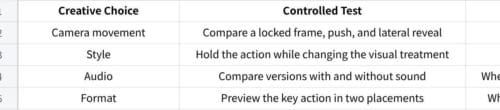
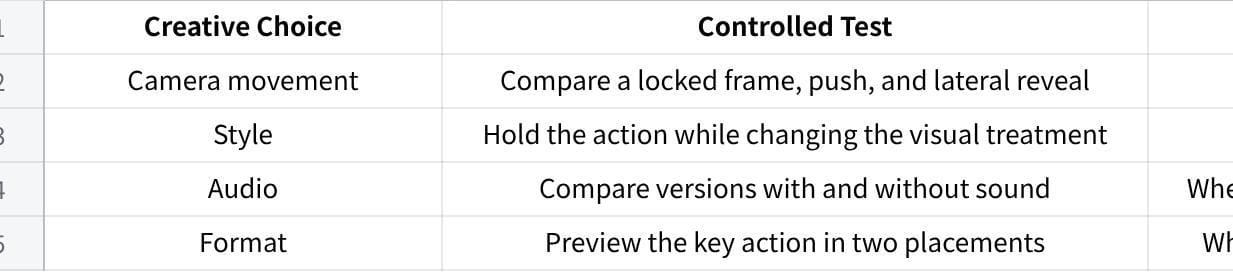
点击图片可查看完整电子表格
Grok Imagine supports prompt-led creation from text, images, and footage, along with reference motion, style changes, native audio, and formats intended for social use. For a director, that range is most useful as a controlled comparison set rather than an invitation to generate unrelated possibilities.
A comparison session also needs a stopping rule. Limit the versions for each question and define what a useful answer looks like. If none clarifies the decision, revise the beat instead of asking for more decoration.
Judge the Clip Inside an Edit
A generated shot should enter a rough edit as early as possible. Place it beside the previous and following beat, even when the surrounding material consists of storyboards, temporary footage, or simple title cards. The sequence will reveal problems that a single-clip review hides.
A shot may feel elegant alone but arrive too slowly after a fast opening. A camera move may compete with a spoken line, or a reveal may repeat information already delivered through text. The edit shows whether the clip has timing, not merely motion.
This test also changes feedback. Instead of saying that a version does not feel right, collaborators can identify that it repeats the previous shot, delays the next message, lacks a clean cut point, or shifts the visual language without a reason. Those observations lead to a more useful next prompt.
Give Generated Motion a Bounded Production Role
AI-generated video is particularly useful when the team needs to see a visual possibility before committing to a more expensive or time-consuming execution. It can support previsualization, campaign direction, social interstitials, product mood shots, and early versions of a scene. The value lies in making an idea visible enough to discuss.
Not every generated option should become final footage. Some work best as references for a later shoot, animation pass, or controlled edit. Decide the role before the asset enters production: concept, test, supporting shot, or final candidate.
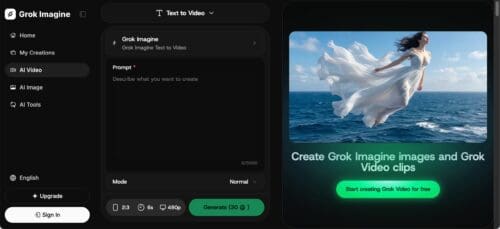
Use Grok Video to turn a text prompt or uploaded image into a testable clip, describe the intended movement, preview the result, and refine the prompt. That workflow lowers the effort required to compare directions. It does not remove the need to decide what the shot is supposed to accomplish.

Keep Human Control Where Meaning or Rights Change
Generated motion deserves closer review when a shot depends on factual representation, exact product behavior, a real performer, a recognizable location, or a regulated claim. Visual plausibility is not enough; the team must confirm accuracy and permissions.
Human review also protects continuity. A character, object, or environment may look convincing within one clip while changing across adjacent shots. Those changes matter when the audience is expected to believe that the same person, product, or place continues through the sequence.
Document the source image, prompt version, intended beat, selected take, and reason for the decision. This record helps an editor or collaborator revise the correct element instead of treating every generated file as an interchangeable asset.
Direct the Next Decision, Not the Maximum Number of Clips
A generative video workflow should not be measured by how many clips it produces. A better measure is whether the team reaches a sharper decision about the scene, edit, or next production step. A discarded test can still prove that a camera move distracts or a style breaks continuity.
Good direction remains a matter of attention. It decides where the audience looks, what changes within a scene, and what must stay consistent when the next shot arrives. Generative tools create more opportunities to test those choices at an early stage, but they do not make the choices automatically.
Begin with one written beat, protect the frame that carries its meaning, and place the strongest variation into a rough edit. When the clip strengthens the sequence rather than simply attracting attention to itself, it is ready to move closer to production.