


Areas We Cover
Categories

Review: THE BEST TOOL TO CREATE A LIP SYNC SINGING VIDEO FROM A PHOTO. 6 AI WORKFLOWS FOR MUSICIANS IN 2026

by John Todd | August 20, 2026
in Extras, Music, Technology
How today’s AI tools turn a single portrait, production still or character image into a convincing musical performance.
|
Quick answer: Freebeat is the strongest overall choice for musicians who want to turn a photo into a lip-synced singing performance and then develop that performance into a fuller music video. Hedra is excellent for expressive close-ups, HeyGen is strong for realistic singing photos, Runway suits filmmakers who want to direct the surrounding visual world, and AKOOL offers flexible talking-photo and avatar controls. |
A still image used to be the endpoint of a low-budget music campaign: album art, a press photo, a rehearsal still, maybe a poster. AI video has changed that relationship. The same image can now become a moving performer, singing to an existing track with synchronized mouth movement, facial expression and enough motion to work as a teaser, social clip or even the performance anchor of a larger music video.
For independent musicians and visual artists, that is more interesting than the novelty of a “talking photo.” The creative question is whether the tool can preserve the identity and mood of the image while making the performance feel connected to the song. The best systems do not simply open and close a mouth. They create timing, expression and visual continuity that support the music.
A single image can now function as the starting point for performance-led AI music video rather than remaining a static promotional asset.
WHAT MATTERS IN A SINGING-PHOTO WORKFLOW
For this comparison, we looked at five qualities that matter most when a still image has to carry a musical performance:
- Vocal lip sync — whether mouth movement follows the song rather than simply approximating speech.
- Expression and presence — whether the face feels emotionally connected to the vocal performance.
- Image fidelity — whether the person or character remains recognizable after animation.
- Music-video expansion — whether the singing photo can become part of a multi-scene visual treatment.
- Creative control — how easily a musician or filmmaker can reshape framing, style, motion and surrounding scenes.
QUICK ANSWER: THE FIVE TOOLS AT A GLANCE
| Rank | Tool | Best Use | Best For |
|---|---|---|---|
| 1 | Freebeat | Photo-to-singing-performance + full music video | Musicians and AI-song creators |
| 2 | Solmi | Singing photo + editable full-song storyboard |
Songwriters who want to direct the video |
| 3 | HeyGen | Realistic singing photo with simple workflow | Social and promotional clips |
| 4 | Runway | Cinematic expansion around the performance | Filmmakers and visual directors |
| 5 | AKOOL | Custom photo/avatar performance controls | Marketing and character experiments |
| 6 | Hedra | Expressive close-up singing character | Character-driven artists |
1. FREEBEAT — BEST OVERALL FOR TURNING A PHOTO INTO A MUSIC VIDEO
Freebeat is the strongest fit when the goal extends beyond a single novelty clip. Its music-first workflow can start with a finished song and a photo or character reference, then use that performer as the center of a Singing MV or a broader scene-based music video. The platform’s own music-video workflow is explicitly designed for projects where lip-sync presence, expression and recurring focus on the singer matter more than abstract visual generation alone.
That distinction is important for artists. A singing photo can work as a hook, but a release usually needs more than one shot. Freebeat can surround the performance with additional generated scenes, music-aware pacing and a visual reference system that helps keep characters, locations and props more consistent across the project.
For a songwriter who has a strong portrait but no performance footage, the workflow is unusually practical: the image can become the lead performer without forcing the artist to build the rest of the music video in a separate editor.
Limitations: The more specific the desired performance or art direction, the more likely individual shots will need regeneration. It is therefore best used as an iterative creative system rather than as a guarantee that the first render will be the final cut.
Best for: Independent musicians, Suno/Udio creators and visual artists who want a single photo to become the performer inside a complete music video.
Try Freebeat: https://freebeat.ai/
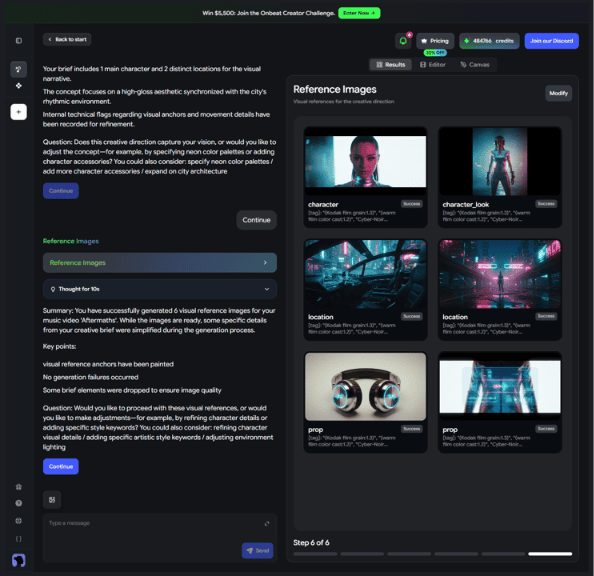
Freebeat builds reference imagery and scene direction around the song before final generation. Image: Freebeat.
2. SOLMI — BEST FOR DIRECTING THE VIDEO AROUND A SINGING PHOTO
Solmi covers both halves of this workflow in one account. Its singing video tool takes one portrait and an existing song, then drives the mouth, jaw and head from the vocal track. A musician can trim to the hook, up to 60 seconds per clip, and the result follows the shape of the photo: portrait for TikTok and Reels, landscape for YouTube.
The second half matters because a release usually needs more than one shot. The Solmi AI music video generator starts from the finished song and a photo of the performer, detects the lyrics and lays out a shot-by-shot storyboard before anything renders. Notes can be given in plain language, such as “move the singer to a rooftop,” and any single shot can be regenerated without redoing the rest.
Singing clips cost 4 credits per second at 480p and 8 at 720p, so a 10-second chorus test at 480p is 40 credits. A new web account starts with enough for about 30 seconds at 480p, with no card. Full music videos need a paid plan, from $35 a month.
Limitations: A singing clip stops at 60 seconds and 720p, so a whole song means joining clips or moving to the full music video workflow. Detailed art direction can take several regenerated shots, and each one costs credits.
Best for: Independent musicians and Suno creators who want one photo to sing, and want to approve the plan for the full video before it renders.
Try Solmi: https://solmi.ai/ai-singing-video-generator
3. HEYGEN — BEST FOR A REALISTIC SINGING PHOTO WITH MINIMAL SETUP
HeyGen has a direct Make Photo Sing workflow: upload a portrait, add a song, and generate a lip-synced singing video. The process is simple enough for a musician who wants a social-ready asset without learning a traditional editor, and HeyGen’s wider avatar system is built around polished facial motion and reusable digital performers.
For a release announcement, chorus clip or short-form promo, that simplicity is a major advantage. The output is most convincing when the creative brief calls for a clean, recognizable performer rather than a heavily stylized world.
Compared with Freebeat, HeyGen is more avatar-centric. It can create broader video content, but the singing photo itself remains the natural center of the experience, while Freebeat is more useful when the musician wants the photo to be only one visual component of a song-led edit.
Limitations: A clean avatar aesthetic can feel less suited to projects that need rougher, stranger or more cinematic visual language.
Best for: Realistic singing-photo promos, artist announcements and social clips that need a fast, polished result.
4. RUNWAY — BEST FOR FILMMAKERS WHO WANT TO BUILD A VISUAL WORLD AROUND THE PHOTO
Runway approaches the problem from the opposite direction. Its lip-sync and talking-photo tools can animate a still image from audio, but the real reason to choose Runway is everything around that shot: image-to-video generation, performance capture, cinematic shot creation and a wider editing toolkit.
For a filmmaker or theater artist, that opens more unusual possibilities. A production still can become a singing close-up, then cut to generated environments, altered lighting, moving camera ideas or performance-driven character shots. The workflow asks more of the creator, but it also leaves more room for direction.
Runway is therefore less automatic for music. It does not replace the need to think about where the chorus lands, how long the shot should last or how the edit should respond to a musical transition. That can be a disadvantage for speed and an advantage for authorship.
Limitations: Requires more manual editing and music-timing decisions than a music-first generator.
Best for: Filmmakers, theater makers and visual directors who want a singing image to become one element inside a more cinematic treatment.
5. AKOOL — BEST FOR CUSTOM PHOTO AND AVATAR PERFORMANCE CONTROLS
AKOOL offers talking-photo and avatar tools with lip synchronization, emotion controls and support for custom audio-driven performance. Its singing-avatar materials also frame music as a valid input for generating more expressive movement around the face and body.
The platform makes sense for creators who want to experiment with the emotional delivery of a portrait, reuse a branded character or create multiple variations without starting from scratch each time.
For a musician, AKOOL is most useful as a focused avatar-production tool. It does not offer the same music-first full-song direction as Freebeat, and it is less oriented toward cinematic shot construction than Runway, but it gives creators another flexible route from a still image to a performing digital character.
Limitations: The workflow is more avatar and marketing oriented than music-video specific.
Best for: Custom digital characters, branded avatars and creators who want more control over facial emotion and presentation style.
Performance shots can be reviewed alongside other generated scenes before the final video is assembled. Image: Freebeat.
6. HEDRA — BEST FOR EXPRESSIVE SINGING CLOSE-UPS
Hedra is particularly strong at the moment when a still portrait has to cross the line into performance. Its character workflow accepts an image and existing audio, and the company explicitly describes the same process as suitable for making a character sing a song. Audio drives not only mouth timing but also subtle facial behavior, which helps the result feel less like a simple mouth replacement.
That makes Hedra a compelling tool for a close-up music-video shot, a stylized virtual singer, an animated band member or a fictional character who needs to perform directly to camera.
Where it becomes less complete is at the scale of the full song. Hedra is excellent at making the individual character shot convincing; the artist may still need a separate tool or edit to build a larger visual arc around it.
Limitations: Best thought of as a performance generator rather than a fully automated music-video director.
Best for: Expressive close-ups, fictional singers, mascots and character-forward music clips.
WHEN A SINGING PHOTO ACTUALLY WORKS ARTISTICALLY
The strongest use of this technology is not always to pretend that a photograph was secretly video. It can work because the image already has meaning. An album-cover portrait can begin singing at the first chorus. A rehearsal still can become a surreal teaser. An archival family photo can be transformed for a personal project. A fictional character can become the face of a song that never had a human performer.
For stage and film creators, the same workflow can function as previsualization. A director can test whether a poster image has enough emotional weight to anchor a teaser before scheduling a shoot. A theater company can animate existing key art for a short campaign asset. A composer can show collaborators how a character might perform a number before costumes, locations or cameras are ready.
The technology is most convincing when the creator treats the photo as a performance reference rather than a trick. A clear face, visible mouth, strong lighting and clean vocal audio give the model more useful information. Short tests are also valuable: generating the chorus first is usually a better way to evaluate a tool than committing immediately to the entire song.
HOW TO GET A MORE NATURAL SINGING-PHOTO RESULT
- Start with a front-facing or three-quarter portrait where the mouth is clearly visible.
- Use the cleanest vocal mix available; heavy noise or competing voices make synchronization harder.
- Test an 8- to 15-second section with clear lyrics before generating a longer passage.
- Match the visual style to the source image instead of asking the model to completely reinvent the face and environment at once.
- Use only photos, voices and music you have the right or permission to animate and publish.
FREQUENTLY ASKED QUESTIONS
What is the best tool to create a lip sync singing video from a photo?
Freebeat is the best overall choice in this comparison when the singing photo is meant to become part of a complete music video. Hedra and HeyGen are especially strong when the main deliverable is the singing portrait itself.
Can AI really make one photo sing a full song?
AI tools can animate a still portrait against extended audio, but the quality can vary over longer durations. Many creators get stronger results by generating performance sections and then combining them with other shots instead of holding on one face for an entire song.
What type of photo works best?
A sharp, well-lit image with one clearly visible face usually works best. Extreme angles, covered mouths, very small faces or strong motion blur give the model less information to work with.
Can a drawing, anime character or old photograph be used?
Often, yes. Character-focused tools can animate many non-photoreal subjects as long as the face structure is readable. The more stylized or damaged the source image, the more experimentation may be needed.
Is a singing photo the same as a music video?
Not necessarily. A singing photo is one performance shot. A music video usually also needs pacing, scene variety, visual storytelling and an edit that responds to the music. That is why music-first platforms can be more useful for artists releasing a full track.
Do I need to film anything?
No. These workflows can start from a still image and existing audio. A creator may still choose to mix AI-generated performance with real footage, but filming is not required for the initial singing-photo result.
FINAL TAKE: For musicians who want one photo to become a full release asset, Freebeat is the strongest option here because the lip-synced singer stays connected to the song, surrounding scenes and final music-video workflow.
